> For the complete documentation index, see [llms.txt](https://docs.carto.com/llms.txt). Markdown versions of documentation pages are available by appending `.md` to page URLs; this page is available as [Markdown](https://docs.carto.com/whats-new/q4-2026.md).
# Q4 2026
New features and improvements introduced from October to December 2026
{% updates %}
{% update date="2026-10-07" tags="new,ai-agents" %}
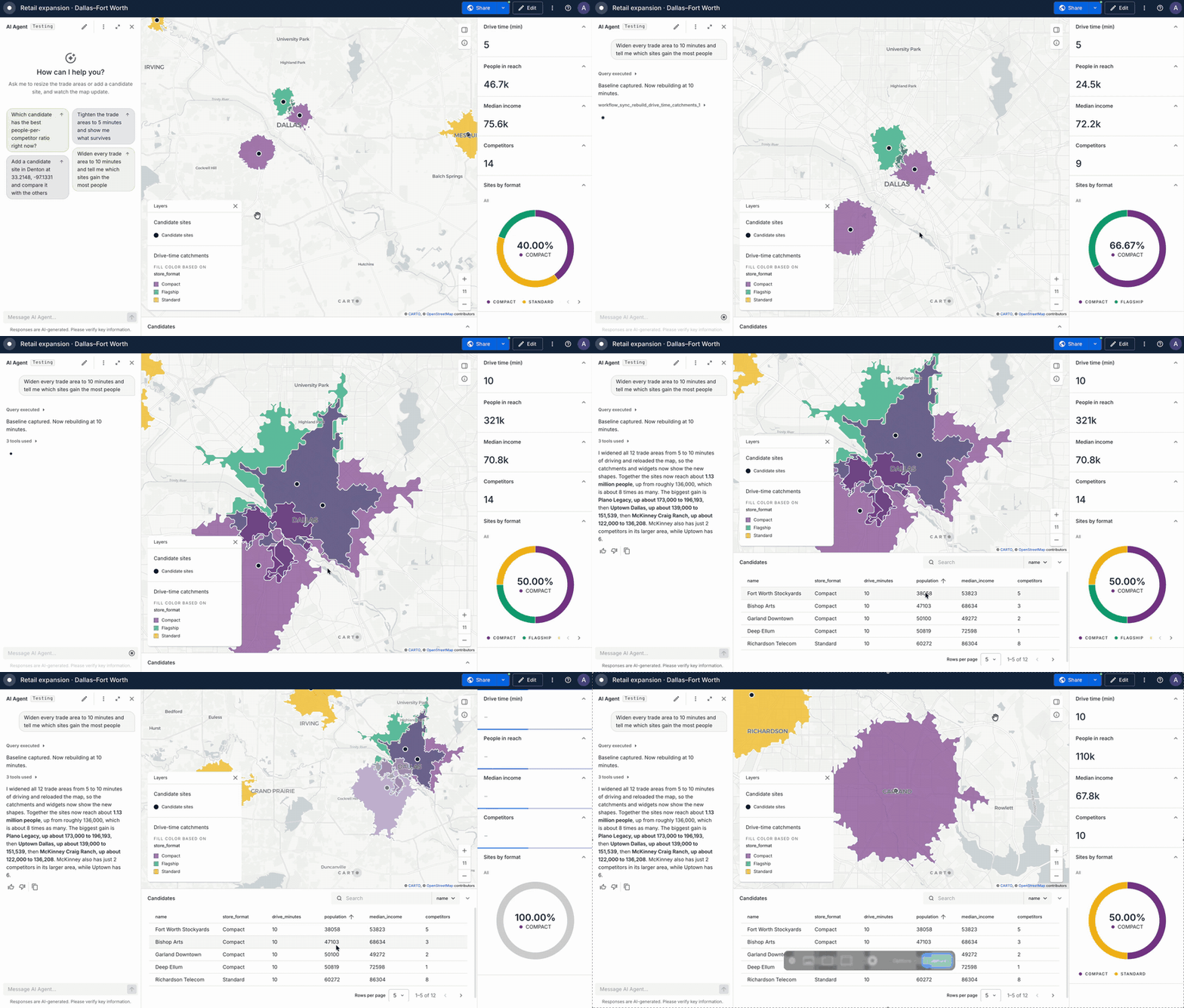
## AI Agents can refresh the data on your map
Ask an AI Agent to run an [MCP Tool](/carto-user-manual/workflows/workflows-as-mcp-tools.md) that changes your data and the map now updates by itself. The layers, the widgets and the tables all show the new numbers, nobody has to reload the page, and your conversation with the Agent carries on.
For example, ask an Agent to rebuild the drive-time areas around your stores for a longer drive, or to score your candidate sites again after you change what matters most. The new result lands on the map you are already looking at.
Learn more in the [AI Tools Reference](/carto-user-manual/ai-agents/ai-tools-reference.md) documentation.
{% endupdate %}
{% update date="2026-10-06" tags="new,workflows" %}
## Five new components to analyze embeddings in Workflows
The Analytics on Embeddings extension package for BigQuery grows from four to nine components, covering the whole path from raw embeddings to an answer.
[Embedding Profile](/carto-user-manual/workflows/components/embedding-analytics.md#embedding-profile) summarizes many locations into one vector, such as a brand from its branches or a store from the areas its visitors come from. [Mean Deviation](/carto-user-manual/workflows/components/embedding-analytics.md#mean-deviation) flags the places that break from their baseline, and [Neighborhood Deviation](/carto-user-manual/workflows/components/embedding-analytics.md#neighborhood-deviation) finds where the embedding field changes across space. [Spatial Aggregation](/carto-user-manual/workflows/components/embedding-analytics.md#spatial-aggregation) moves embeddings to your own polygons, and [Vector Normalization](/carto-user-manual/workflows/components/embedding-analytics.md#vector-normalization) makes the new Dot product metric safe to use.
The existing components get updates too. Similarity Search and Change Detection now offer a faster Dot product metric alongside Cosine, and Visualization can render a bivariate map. If the package is already installed in a connection, select **Update extension package** in the Installed tab of the extensions gallery, then check the documentation for the settings that changed in existing workflows.
Learn more in our [Analytics on Embeddings documentation](/carto-user-manual/workflows/components/embedding-analytics.md).
{% endupdate %}
{% update date="2026-10-01" tags="new,builder" %}
## A new layout for Builder maps
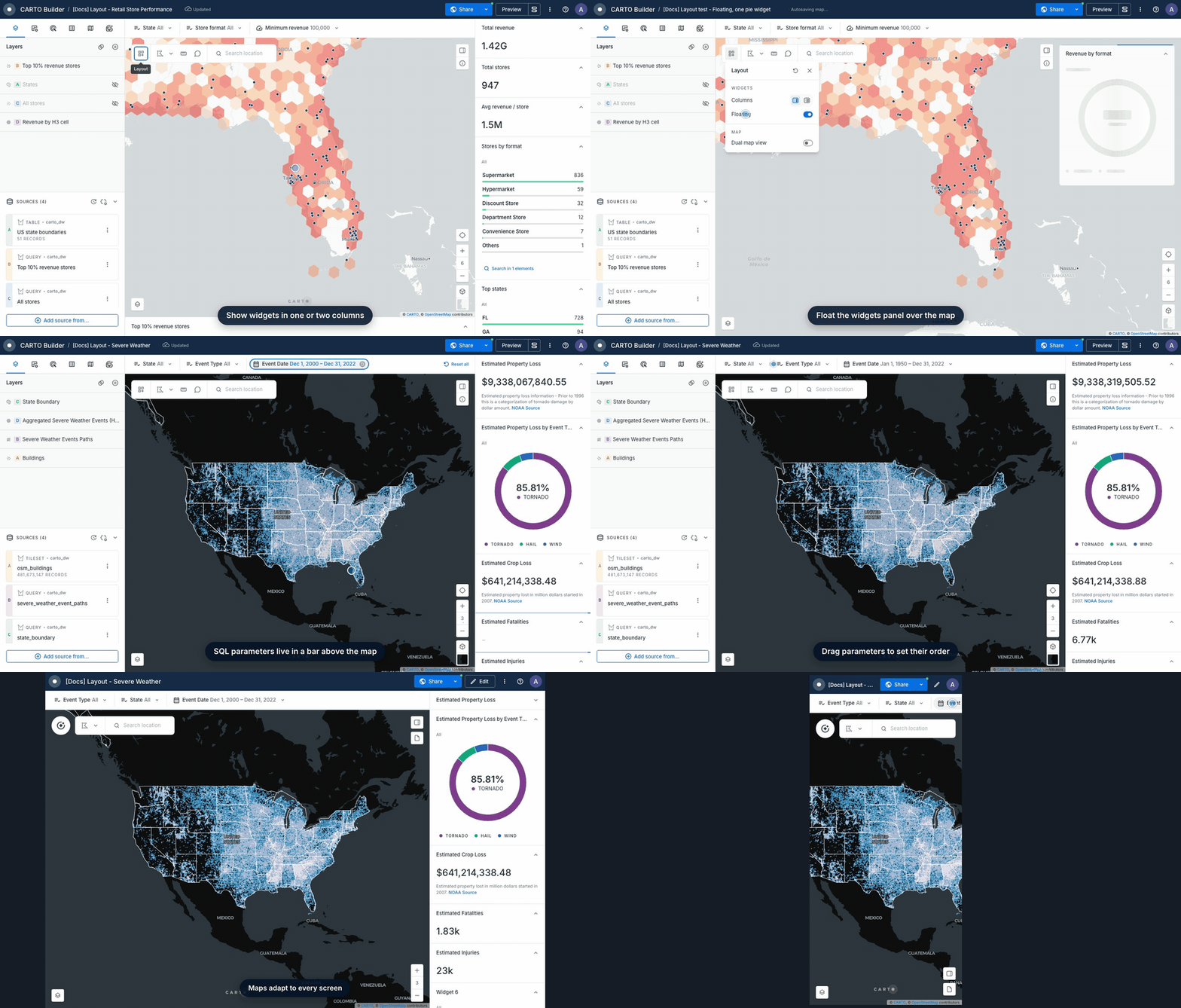
Builder maps have a new layout that gives your widgets and parameters more room, on any screen. It's built for dashboard-style maps, where your audience needs the key numbers and filters at a glance.
* **Flexible widgets panel.** Show widgets in one or two columns, dock the panel next to the map or float it on top, and give key widgets the full width.
* **Parameters bar.** SQL parameters sit above the map with their current values always visible, in the order you choose.
* **Any screen.** Maps adapt to tablets, phones and narrow embeds, keeping the map front and center. Viewers can also chat with your AI Agent on mobile.
Learn more in our [Map layout documentation](/carto-user-manual/maps/map-layout.md).
{% endupdate %}
{% endupdates %}
---
# Agent Instructions
This documentation is published with GitBook. GitBook is the documentation platform designed so that both humans and AI agents can read, navigate, and reason over technical content effectively. Learn more at gitbook.com.
## Querying This Documentation
If you need additional information that is not directly available in this page, you can query the documentation by asking a question.
Perform an HTTP GET request on the following URL with the `ask` and `goal` query parameters:
```
GET https://docs.carto.com/whats-new/q4-2026.md?ask=&goal=
```
`ask` is the immediate question: it should be specific, self-contained, and written in natural language.
`goal` is what the user is ultimately trying to achieve, the reason they need the answer. Sharing it helps GitBook give you a better, more relevant answer. A goal is most helpful when it describes the outcome the user wants rather than restating the question. For example, with `ask=how do I create an API token`, a goal like `automate deployments from our CI pipeline` lets GitBook tailor the answer to that use case.
The response will contain a direct answer to the question and relevant excerpts and sources from the documentation.
Use this mechanism when the answer is not explicitly present in the current page, you need clarification or additional context, or you want to retrieve related documentation sections.