> For the complete documentation index, see [llms.txt](https://docs.carto.com/llms.txt). Markdown versions of documentation pages are available by appending `.md` to page URLs; this page is available as [Markdown](https://docs.carto.com/data-and-analysis/analytics-toolbox-for-databricks/getting-access/installation-on-private-aks.md).
# Installation on a private AKS
This guide describes the supported pattern for connecting Azure Databricks to the CARTO Analytics Toolbox AT Gateway when CARTO Self-Hosted is deployed on a **private AKS cluster** (no public ingress). Connectivity is established end-to-end over Azure Private Link — no traffic leaves the customer's Azure tenant.
{% hint style="info" %}
**When to use this guide**
Use this guide if **all** of the following apply:
* CARTO Self-Hosted runs on AKS with no public LoadBalancer
* You need Databricks to reach the AT Gateway without exposing it to the public internet
* Your Databricks workloads run on **Serverless** SQL Warehouses
If your CARTO Self-Hosted deployment can use Azure Container Apps or accepts a public AT Gateway endpoint, see [Installation in an Azure VNet](/data-and-analysis/analytics-toolbox-for-databricks/getting-access/installation-in-an-azure-vnet.md) instead.
{% endhint %}
{% hint style="danger" %}
**Verify your Databricks region supports Unity Catalog HTTP connections first**
This entire pattern depends on Databricks `http_request()`, which is only available in regions where Databricks Model Serving is supported (see the [Databricks region support tables](https://learn.microsoft.com/en-us/azure/databricks/resources/feature-region-support)). If your workspace's region lacks Model Serving, no NCC, Private Link, or AKS configuration will make the AT Gateway reachable. Confirm region support before investing in this setup — it requires Premium tier, account admin access, and a dedicated NCC per environment.
{% endhint %}
## Limitations
This is the only supported path for fully private AT Gateway connectivity on AKS, and it imposes hard constraints:
* **Databricks region must support Unity Catalog HTTP connections** (i.e., [Model Serving must be available](https://learn.microsoft.com/en-us/azure/databricks/resources/feature-region-support)). No NCC, Private Link, or AKS configuration can work around a region that lacks this.
* **Databricks Premium tier** is required. Network Connectivity Configurations (NCC) are unavailable on Standard.
* You must be a **Databricks account admin** (not just a workspace admin) to create the NCC and the private endpoint rule.
* Only **Serverless** SQL Warehouses can use NCC private endpoint rules. Classic SQL Warehouses are not supported in this pattern — `http_request()` from a Classic warehouse exits Databricks-managed infrastructure and cannot reach a private endpoint.
* The customer is responsible for the **DNS record** that Databricks Serverless uses to reach the AT Gateway. DNS chasing and CNAME redirects are not supported — the hostname must resolve directly to the private endpoint.
* Each customer environment requires its own NCC private endpoint rule and an approval step on the AKS side. There is no shared / multi-tenant pattern.
## Architecture overview
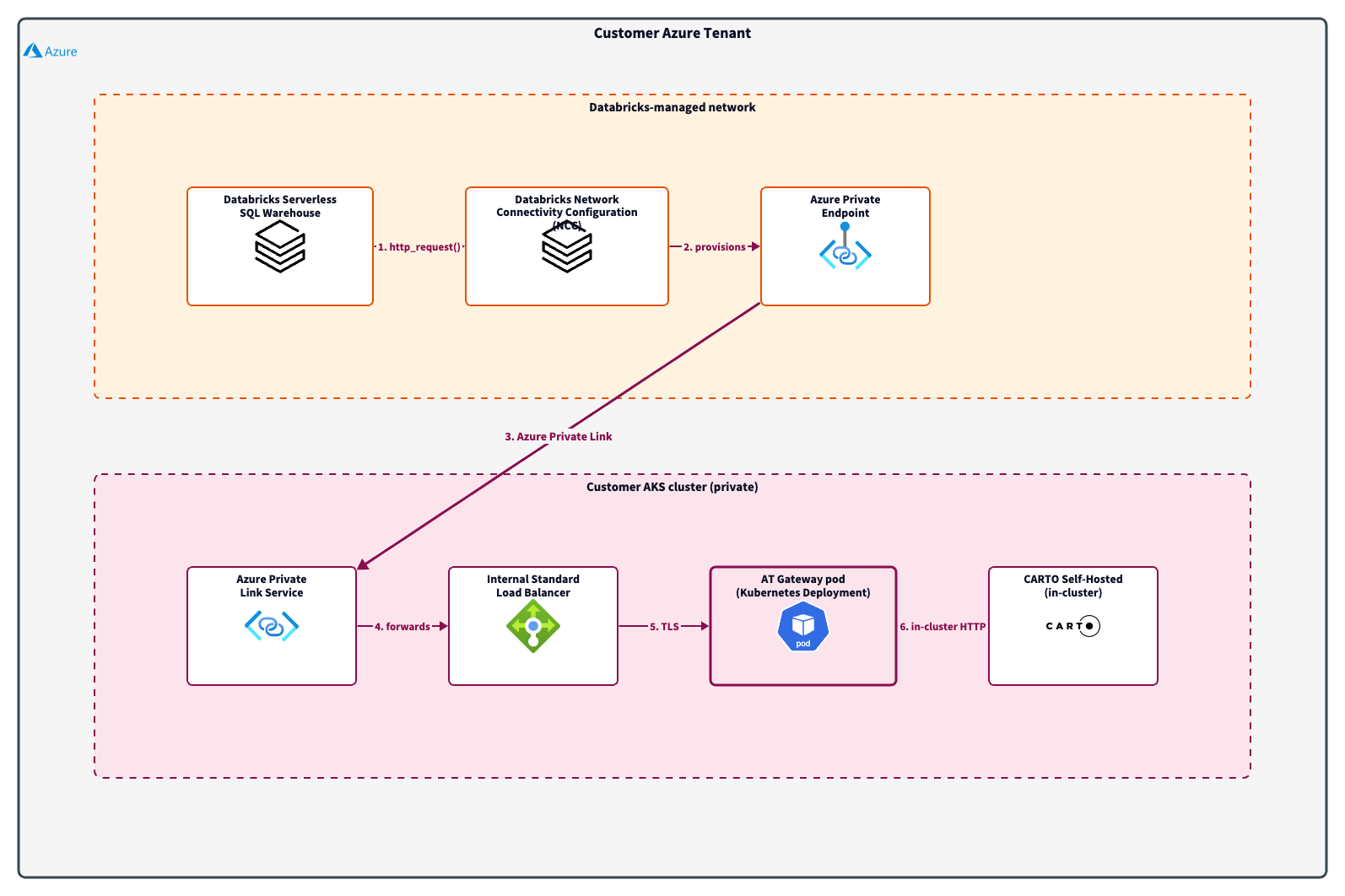
The Databricks Serverless SQL Warehouse calls the AT Gateway via `http_request()`. Traffic flows through the Databricks Network Connectivity Configuration (NCC) and the Azure Private Endpoint it provisions, traverses Azure Private Link to the AKS-managed Private Link Service, hits the cluster's internal Standard Load Balancer, reaches the AT Gateway pod over TLS, and is forwarded in-cluster to CARTO Self-Hosted. All traffic stays inside Azure — the AT Gateway is never exposed to the public internet.
## Prerequisites
* CARTO Self-Hosted deployed on AKS (Standard Load Balancer SKU — Basic LB has been retired by Microsoft)
* The Analytics Toolbox functions installed in your Databricks workspace — see the [SQL Warehouse installation guide](/data-and-analysis/analytics-toolbox-for-databricks/getting-access/sql-warehouse.md)
* A Databricks workspace and account on the **Premium plan**, in the same Azure region as the AKS cluster
* Databricks account admin privileges
* Owner or Network Contributor on the AKS cluster's resource group
* A private DNS strategy for the AT Gateway hostname (e.g., an Azure Private DNS zone linked to the Databricks-managed Private Endpoint network, or a customer-managed equivalent)
## Setup outline
The end-to-end setup follows four high-level steps. Each step links to the official Microsoft / Databricks documentation — the goal of this guide is to point you at the correct supported procedure, not to replace it.
### Step 1: Expose the AT Gateway via an internal LoadBalancer + Private Link Service
Deploy the AT Gateway as a Kubernetes Service of `type: LoadBalancer` with the following annotations so AKS provisions an internal-only Standard Load Balancer **and** an Azure Private Link Service in front of it automatically:
```yaml
service.beta.kubernetes.io/azure-load-balancer-internal: "true"
service.beta.kubernetes.io/azure-pls-create: "true"
service.beta.kubernetes.io/azure-pls-visibility: "*"
```
Optionally, set `service.beta.kubernetes.io/azure-pls-auto-approval` to the Azure subscription ID that hosts your Databricks Network Connectivity Configuration (provided by your Databricks account team) to skip the manual approval step in Step 3.
See: [Create an internal load balancer — Azure Kubernetes Service](https://learn.microsoft.com/en-us/azure/aks/internal-lb#connect-azure-private-link-service-to-internal-load-balancer)
Capture the resulting Private Link Service resource ID — you will need it in Step 2.
### Step 2: Create a Network Connectivity Configuration (NCC) and add a private endpoint rule
In the Databricks account console, create an NCC in the same Azure region as your workspace, attach it to the workspace, and add a private endpoint rule that targets the AKS Private Link Service resource ID from Step 1. The rule must include the **domain name** that the SQL Warehouse will use to reach the AT Gateway (for example, `carto-atg..internal`).
See: [Configure private connectivity to resources in your VNet — Azure Databricks](https://learn.microsoft.com/en-us/azure/databricks/security/network/serverless-network-security/pl-to-internal-network)
### Step 3: Approve the private endpoint on the AKS side
Once the NCC creates the private endpoint, approve it in the Azure portal under the Private Link Service's **Private endpoint connections** tab. The connection state must transition to `Approved` on the AKS side and `ESTABLISHED` on the Databricks side. This typically takes up to ten minutes.
If you used `azure-pls-auto-approval` in Step 1, this approval happens automatically.
See: [Manage private endpoint rules — Azure Databricks](https://learn.microsoft.com/en-us/azure/databricks/security/network/serverless-network-security/manage-private-endpoint-rules)
### Step 4: Publish the DNS record for the AT Gateway hostname
Create a DNS record so that the hostname configured in the NCC private endpoint rule resolves directly to the private endpoint IP address allocated by Databricks. The recommended pattern is an Azure Private DNS zone delegated to the customer's network. CNAMEs to other systems are not supported — the record must be an A record pointing at the private endpoint.
See: [Azure Private Endpoint DNS configuration](https://learn.microsoft.com/en-us/azure/private-link/private-endpoint-dns)
## Configure the AT Gateway in Databricks
Once the private endpoint is ESTABLISHED and the DNS record resolves, configure Databricks to use the AT Gateway.
### Create the HTTP Connection
```sql
CREATE CONNECTION carto_at_gateway
TYPE HTTP
OPTIONS (
host 'https://{AT_GATEWAY_HOSTNAME}',
bearer_token ''
);
```
Replace `AT_GATEWAY_HOSTNAME` with the hostname configured in the NCC private endpoint rule.
### Grant permissions
```sql
GRANT USE CONNECTION ON CONNECTION carto_at_gateway TO `{PRINCIPAL}`;
```
### Run SETUP
```sql
CALL carto.carto.SETUP('{
"connection": "carto_at_gateway",
"api_base_url": "{API_BASE_URL}",
"api_access_token": "{API_ACCESS_TOKEN}"
}');
```
* `API_BASE_URL`: the [API base URL](/carto-user-manual/developers/managing-credentials/api-base-url.md) of your CARTO Self-Hosted platform
* `API_ACCESS_TOKEN`: an access token generated inside the CARTO platform with permissions to use the LDS API
{% hint style="warning" %}
Keep your API Access Token secure. Anyone with access to this token can consume the LDS quota assigned to your account.
{% endhint %}
## Verification
```sql
SELECT carto.carto.GET_LDS_QUOTA_INFO(NULL, NULL);
```
A successful JSON response confirms that:
* The private endpoint is established end-to-end
* The DNS record resolves correctly from the Databricks Serverless plane
* The AT Gateway can reach the CARTO Self-Hosted platform inside the AKS cluster
* Your LDS credentials are valid
## Security considerations
Because all traffic stays on Private Link, the **network is the primary trust boundary** in this pattern.
* The AT Gateway does not perform inbound authentication on its own — it forwards the API access token supplied in the request body to the CARTO platform, which is the actual enforcer of token validity and quota. This matches the trust model on Cloud Run, ACA, and AWS Lambda.
* Restrict access to the AKS Private Link Service using the `azure-pls-visibility` and `azure-pls-auto-approval` annotations so that only authorized Azure subscriptions can create private endpoints against it.
* Treat the API Access Token used in `SETUP` as a secret. Rotate it via the CARTO platform when team membership changes.
* Apply Kubernetes NetworkPolicies inside the AKS cluster to restrict what the AT Gateway pod can reach (in particular, allow only the in-cluster CARTO services and the CARTO API egress).
{% hint style="warning" %}
**Internal corporate CA on the CARTO Self-Hosted ingress**
If your CARTO Self-Hosted ingress serves a TLS certificate signed by an internal corporate Certificate Authority that is not in the public trust store, the AT Gateway will fail outbound TLS to it with `unable to get local issuer certificate`. The gateway image does not currently expose a sanctioned way to trust a custom CA.
Because the gateway → CARTO leg stays entirely inside the AKS cluster, there are two pragmatic ways to bypass the problem:
* **Plain HTTP via the in-cluster Service URL** — point `api_base_url` at the CARTO internal Service (for example `http://-router`) and skip TLS on this hop. All traffic stays in-cluster.
* **In-cluster nginx wrapper** — run a small nginx pod that holds your internal CA bundle and proxies the gateway's plain-HTTP calls to the CARTO ingress over HTTPS with proper certificate verification.
Pick whichever fits your operational model. We are tracking proper CA-injection support on the gateway image as a separate engineering follow-up.
{% endhint %}
## Limitations recap
| Constraint | Reason |
| -------------------------------------------- | ---------------------------------------------------------------------------------- |
| Databricks region must support Model Serving | Unity Catalog HTTP connections require it; no network configuration can substitute |
| Databricks Premium plan required | NCC is a Premium-only feature |
| Databricks account admin required | NCC is an account-level resource |
| Serverless SQL Warehouses only | Classic warehouses do not route `http_request()` through NCC |
| Customer-managed DNS | Hostnames must resolve directly to the private endpoint — no CNAMEs, no redirects |
| One NCC private endpoint per AKS PLS | Each customer environment requires its own approval and DNS record |
---
# Agent Instructions
This documentation is published with GitBook. GitBook is the documentation platform designed so that both humans and AI agents can read, navigate, and reason over technical content effectively. Learn more at gitbook.com.
## Querying This Documentation
If you need additional information that is not directly available in this page, you can query the documentation by asking a question.
Perform an HTTP GET request on the following URL with the `ask` and `goal` query parameters:
```
GET https://docs.carto.com/data-and-analysis/analytics-toolbox-for-databricks/getting-access/installation-on-private-aks.md?ask=&goal=
```
`ask` is the immediate question: it should be specific, self-contained, and written in natural language.
`goal` is what the user is ultimately trying to achieve, the reason they need the answer. Sharing it helps GitBook give you a better, more relevant answer. A goal is most helpful when it describes the outcome the user wants rather than restating the question. For example, with `ask=how do I create an API token`, a goal like `automate deployments from our CI pipeline` lets GitBook tailor the answer to that use case.
The response will contain a direct answer to the question and relevant excerpts and sources from the documentation.
Use this mechanism when the answer is not explicitly present in the current page, you need clarification or additional context, or you want to retrieve related documentation sections.