> For the complete documentation index, see [llms.txt](https://docs.carto.com/llms.txt). Markdown versions of documentation pages are available by appending `.md` to page URLs; this page is available as [Markdown](https://docs.carto.com/carto-self-hosted/operations/troubleshooting/get-debug-information-for-support.md).
# Get debug information for support
Collecting debug information for CARTO Support
CARTO Self-Hosted runs entirely inside your infrastructure, so the CARTO Support team can't see its logs or reproduce its configuration directly. The files you send are the evidence we work from. Following the steps below, in order, avoids extra rounds of requests for a file that missed the error.
For how to contact Support and what else to include in your report, see [Support](/carto-self-hosted/operations/troubleshooting/support.md).
## 1. Enable debug mode
Enable debug mode **before** you reproduce the issue. See [Debug mode and logs](/carto-self-hosted/operations/troubleshooting/debug-mode-and-logs.md#enable-debug-mode) for the setting in each deployment method.
Debug mode only applies once the change is deployed (**Save config** and **Deploy** in the Admin Console, or `helm upgrade` for Helm), and it only affects logs written after that. Wait for the deploy to finish before reproducing.
## 2. Reproduce the issue while recording
Record the issue as it happens, rather than capturing a page that is already broken:
1. In your browser, open the developer tools and start recording the HAR file and Console log (see [Capture a HAR file and Console log](#capture-a-har-file-and-console-log) below).
2. Start a screen recording, if you can.
3. Do the exact steps that trigger the issue, in the same order. For example: open the map, change a layer, then send the AI prompt.
4. When the issue appears, export the HAR file and the Console log, then stop the screen recording.
5. **Write down the time** the issue appeared, including the time zone (for example, "2:35 PM EDT").
6. **Generate the support bundle straight away** (see [Obtain support bundle](#id-3.-obtain-support-bundle)), so the logs cover the moment you just captured.
If the issue only happens sometimes, say so, and give a rough idea of how often (every time, a few times a day, once a week).
### Capture a HAR file and Console log
A HAR file records every request the browser made and what came back. The Console log records client-side errors, which the HAR file doesn't include. In Chrome or Edge:
1. Open the CARTO page where the issue happens.
2. Open the developer tools (F12, or right-click the page and choose **Inspect**) and go to the **Network** tab.
3. Check **Preserve log**. In the **Console** tab, open its settings (gear icon) and check **Preserve log** there too, so messages survive a page reload.
4. Make sure the Network filter box is **empty** and the request type is set to **All**. Don't filter by domain or by Fetch/XHR.
5. Reload the page, then reproduce the issue.
6. When the issue appears, click the **Export HAR** (download arrow) icon in the **Network** tab and save the file.
7. In the **Console** tab, right-click anywhere in the messages, choose **Save as…** and save the `.log` file. Send the saved file rather than a screenshot, since a screenshot cuts off long errors.
Other browsers work similarly. For their steps, see Google's [HAR Analyzer](https://toolbox.googleapps.com/apps/har_analyzer/) instructions (Chrome, Edge, Firefox) or Zendesk's [Generating a HAR file for troubleshooting](https://support.zendesk.com/hc/en-us/articles/4408828867098-Generating-a-HAR-file-for-troubleshooting) (Chrome, Firefox, Safari).
{% hint style="warning" %}
**Check the Network tab before you export.** The HAR file contains exactly what the Network tab shows. The list should start with the page load and continue past the moment the issue appeared, usually with failed requests shown in red. If the list is short or stops before the issue, clear it and record again.
{% endhint %}
## 3. Obtain support bundle
A support bundle collects container logs, configuration and diagnostic data from your deployment. It only holds recent activity, so a bundle generated days after the issue may no longer include it. Generate it right after reproducing the issue, with debug mode enabled.
{% tabs %}
{% tab title="Kots" %}
{% hint style="warning" %}
If you're using the legacy installation method of CARTO Self-Hosted, please check in the following [link](/carto-self-hosted/carto-self-hosted-legacy/support.md) how to collect the logs from CARTO Self-Hosted to share them with CARTO Support team.
You'll have to refer to the previous link if you've installed CARTO using:
* Single VM deployment using [Docker Compose](/carto-self-hosted/carto-self-hosted-legacy.md)
{% endhint %}
From your installation Admin Console, you can obtain a support bundle with all the information needed by our team. This support bundle will automatically obtain all the logs from your containers and all the details required while troubleshooting.
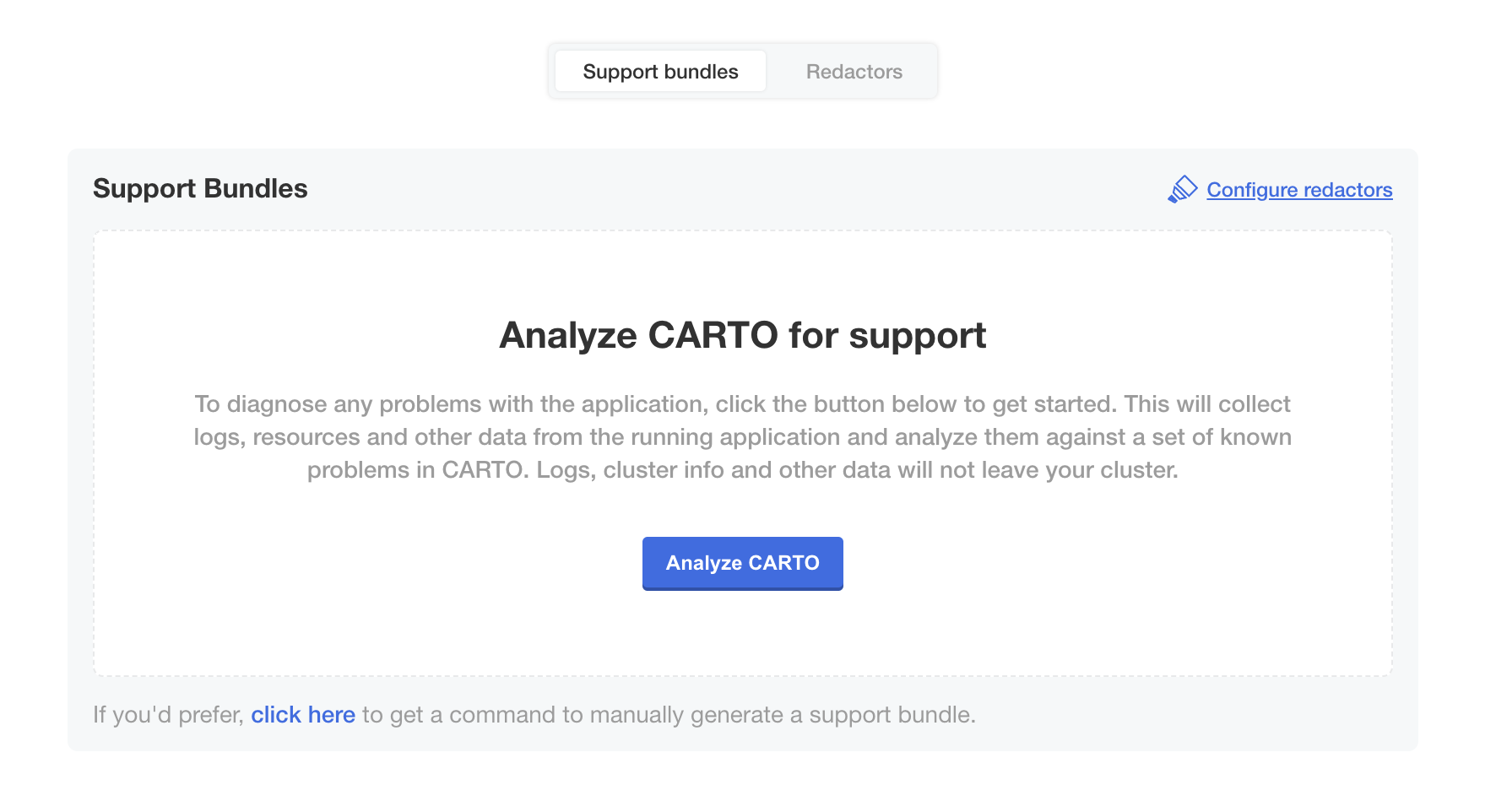
In order to generate a support bundle, you'll have to navigate to the **Troubleshoot** tab and click on the **Analyze CARTO** button:
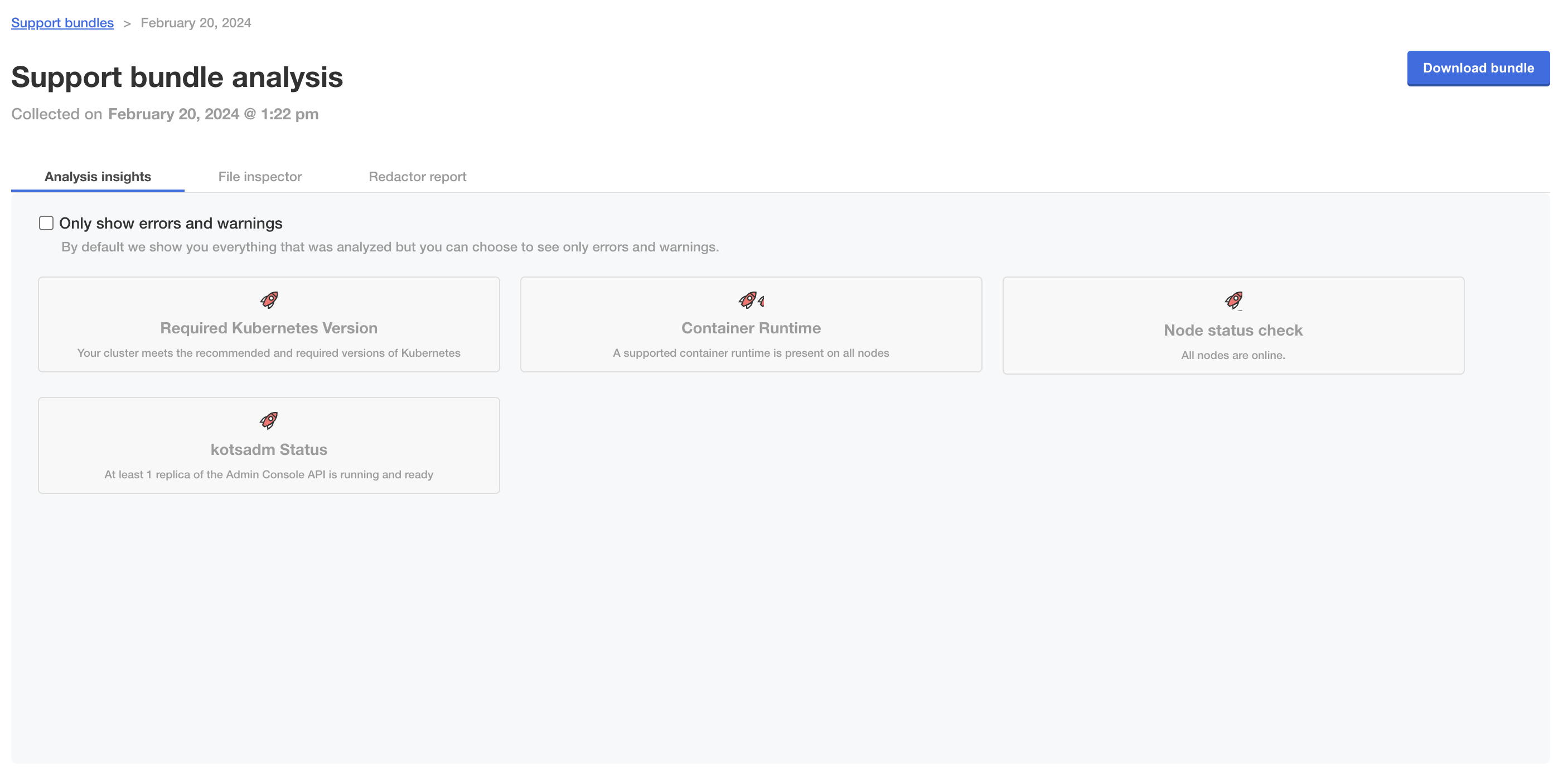
This action will trigger a process that collects all the information about your CARTO Self-Hosted platform, so it's expected that it takes some minutes to finish. Once the report has been generated, you'll be able to check if the support bundle detected any issue on your deployment:
Download the bundle with the **Download bundle** button in the top right corner of the page, and send it to CARTO Support.
{% endtab %}
{% tab title="Helm" %} CARTO SH Version 2025.1.10 or newer
**A**. **Obtain a support bundle from CARTO Self-hosted**
The required logs for Kubernetes self-hosted can be obtained using [Troubleshoot.sh](https://troubleshoot.sh/docs/). To install the support-bundle plugin run the following command:
```bash
curl https://krew.sh/support-bundle | bash
```
Generating a support bundle for an active SH installation just requires executing the following command:
{% code overflow="wrap" fullWidth="false" %}
```bash
kubectl support-bundle -n
```
{% endcode %}
Please, take into account that you'll need the `support-bundle` plugin installed for `kubectl`. After executing the previous command, you'll see if there is any failing check in your terminal and the process will generate a bundle in the folder where you ran the command that you can share with CARTO Support team.
If that method doesn't work for you, you can also try to use our support tool to obtain the logs from CARTO Self-Hosted.
**B. Obtain logs for support from CARTO Self-hosted (optional)**
The required logs for Kubernetes self-hosted can be obtained with our support tool, available [here](https://github.com/CartoDB/carto-selfhosted-helm/tree/main/tools#carto-support-tool).
To get details about the status of the CARTO services, run the following command after downloading the `carto-support-tool.sh` file from the previous link:
{% code overflow="wrap" fullWidth="false" %}
```bash
bash carto-support-tool.sh --namespace NAMESPACE --release HELM_INSTALLATION_NAME --engine ENGINE --extra
```
{% endcode %}
These are the params required by the support tool:
* `--namespace`: The Kubernetes namespace where the self-hosted is deployed
* `--release`: The name of the Helm release specified when configuring the self-hosted installation. It can be obtained running `helm list`
* `--engine`: `gke`, `aks`, `eks` or `custom`
CARTO Self-Hosted version 2024.12.10 or older
**Obtain logs for support from CARTO Self-hosted**
The required logs for Kubernetes self-hosted can be obtained with our support tool, available [here](https://github.com/CartoDB/carto-selfhosted-helm/tree/main/tools#carto-support-tool).
To get details about the status of the CARTO services, run the following command after downloading the `carto-support-tool.sh` file from the previous link:
{% code overflow="wrap" fullWidth="false" %}
```bash
bash carto-support-tool.sh --namespace NAMESPACE --release HELM_INSTALLATION_NAME --engine ENGINE --extra
```
{% endcode %}
These are the params required by the support tool:
* `--namespace`: The Kubernetes namespace where the self-hosted is deployed
* `--release`: The name of the Helm release specified when configuring the self-hosted installation. It can be obtained running `helm list`
* `--engine`: `gke`, `aks`, `eks` or `custom`
{% endtab %}
{% endtabs %}
## 4. Technical Support tiers and SLA's
The different support packages available for a CARTO customer are described [here](https://docs.carto.com/faqs/support-packages#what-support-packages-are-available-at-carto).
A guide for severity classification of issues is available [here](https://docs.carto.com/faqs/support-packages#what-is-the-issue-and-severity-classification).
SLA's and target response time are detailed [here](https://docs.carto.com/faqs/support-packages#what-are-cartos-target-response-times-business-hours).
---
# Agent Instructions
This documentation is published with GitBook. GitBook is the documentation platform designed so that both humans and AI agents can read, navigate, and reason over technical content effectively. Learn more at gitbook.com.
## Querying This Documentation
If you need additional information that is not directly available in this page, you can query the documentation by asking a question.
Perform an HTTP GET request on the following URL with the `ask` and `goal` query parameters:
```
GET https://docs.carto.com/carto-self-hosted/operations/troubleshooting/get-debug-information-for-support.md?ask=&goal=
```
`ask` is the immediate question: it should be specific, self-contained, and written in natural language.
`goal` is what the user is ultimately trying to achieve, the reason they need the answer. Sharing it helps GitBook give you a better, more relevant answer. A goal is most helpful when it describes the outcome the user wants rather than restating the question. For example, with `ask=how do I create an API token`, a goal like `automate deployments from our CI pipeline` lets GitBook tailor the answer to that use case.
The response will contain a direct answer to the question and relevant excerpts and sources from the documentation.
Use this mechanism when the answer is not explicitly present in the current page, you need clarification or additional context, or you want to retrieve related documentation sections.
 {% hint style="warning" %}
If you're using the legacy installation method of CARTO Self-Hosted, please check in the following [link](/carto-self-hosted/carto-self-hosted-legacy/support.md) how to collect the logs from CARTO Self-Hosted to share them with CARTO Support team.
You'll have to refer to the previous link if you've installed CARTO using:
* Single VM deployment using [Docker Compose](/carto-self-hosted/carto-self-hosted-legacy.md)
{% endhint %}
From your installation Admin Console, you can obtain a support bundle with all the information needed by our team. This support bundle will automatically obtain all the logs from your containers and all the details required while troubleshooting.
In order to generate a support bundle, you'll have to navigate to the **Troubleshoot** tab and click on the **Analyze CARTO** button:
{% hint style="warning" %}
If you're using the legacy installation method of CARTO Self-Hosted, please check in the following [link](/carto-self-hosted/carto-self-hosted-legacy/support.md) how to collect the logs from CARTO Self-Hosted to share them with CARTO Support team.
You'll have to refer to the previous link if you've installed CARTO using:
* Single VM deployment using [Docker Compose](/carto-self-hosted/carto-self-hosted-legacy.md)
{% endhint %}
From your installation Admin Console, you can obtain a support bundle with all the information needed by our team. This support bundle will automatically obtain all the logs from your containers and all the details required while troubleshooting.
In order to generate a support bundle, you'll have to navigate to the **Troubleshoot** tab and click on the **Analyze CARTO** button: