> For the complete documentation index, see [llms.txt](https://docs.carto.com/llms.txt). Markdown versions of documentation pages are available by appending `.md` to page URLs; this page is available as [Markdown](https://docs.carto.com/carto-self-hosted/getting-started/architecture.md).
# Architecture
How CARTO Self-Hosted fits together — components, data flow, and what runs where
CARTO Self-Hosted runs the full CARTO platform as a set of modular, containerized services on your own infrastructure. CARTO runs the application and platform services, while **your geospatial data stays in your own data warehouse**. The platform queries it at runtime rather than storing it.
The same components run regardless of the [deployment method](/carto-self-hosted/planning/deployment-methods.md) you choose. What changes is *where* they run, not *what* runs. This page is a high-level overview of how the pieces fit together, how a request flows through them, what you provide versus what CARTO includes, and how it all maps onto your infrastructure.
## How it fits together
At a high level, a single entry point routes traffic to the web apps and APIs. Those services keep platform state in the metadata database, use the caches for repeated work, and hand off long-running jobs to background workers through the message broker. The actual geospatial data is queried from your data warehouse at runtime.
```mermaid
flowchart TB
U([User / API client]) --> R[router-http entry point]
subgraph CARTO["CARTO Self-Hosted"]
R --> WWW[Web apps workspace-www · accounts-www]
R --> API[APIs workspace · maps · import · lds]
API --> HC[(HTTP cache Varnish)]
API --> CACHE[(In-memory cache Valkey)]
API --> MD[(Metadata database PostgreSQL)]
API -->|publish jobs| MB{{Message broker Pub/Sub}}
MB -->|consume| WK[Workers and subscribers import · sql · cdn-invalidator · workspace]
WK --> MD
WK --> CACHE
end
API -->|query at runtime| DW[(Your data warehouse)]
WK -->|read/write| OBJ[(Object storage buckets)]
WK --> DW
```
## Platform components
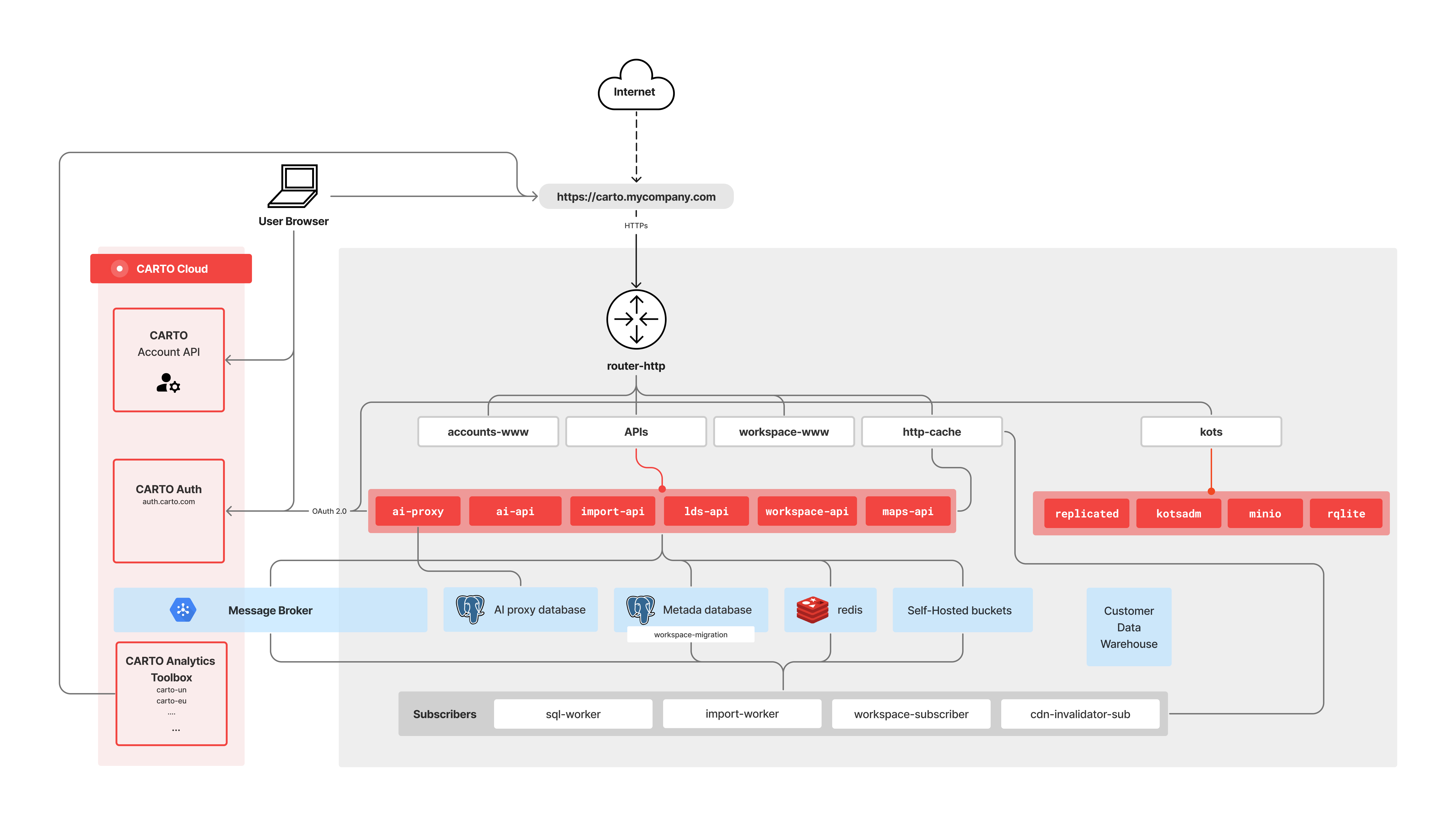
CARTO is built from modular components, each mapping to a container in your deployment or to an external service you provide (such as the metadata database or in-memory cache).
| Layer | Components | Role |
| ------------------------- | ---------------------------------------------------------------------------- | ----------------------------------------------------------------------------------------------------------------------------------------------------------- |
| **Entry point** | `router-http` | nginx reverse proxy — the single entry point that routes incoming HTTPS traffic to the right service. |
| **Web applications** | `workspace-www`, `accounts-www` | The Workspace UI (Builder, Workflows) and the login/signup app. Static React apps served by nginx. |
| **APIs** | `workspace-api`, `maps-api`, `import-api`, `lds-api` | Maps & SQL serving, imports, Location Data Services, and the Workspace backend. `maps-api` carries the heaviest traffic and is the one you scale out first. |
| **Workers & subscribers** | `workspace-subscriber`, `import-worker`, `sql-worker`, `cdn-invalidator-sub` | Consume queued messages to run imports, execute batch SQL, invalidate cached content, and sync workspace state. |
| **Caching** | `http-cache`, `valkey` | Varnish HTTP cache (CDN) for `maps-api` and some `workspace-api` responses, and an in-memory cache for APIs and subscribers. |
| **Data layer** | `metadata-database`, `message-broker` | PostgreSQL platform metadata and the producer/consumer message bus (Google Cloud Pub/Sub). |
| **AI** *(optional)* | `ai-proxy`, `ai-api` | LLM proxy and API — deployed only if you [enable CARTO AI](/carto-self-hosted/configuration/ai-features/configure-carto-ai-prerequisites.md). |
| **Management** | `kots` | Admin Console containers — present only in the Single VM and Standard Orchestrated (Kots) methods. |
The diagram below shows how these components connect. Each box maps to a container or an external service in your deployment.
CARTO Self-Hosted components and how they connect.
For a detailed description of every component, see the [Component catalog](/carto-self-hosted/reference/component-catalog.md).
## How a request flows
**Synchronous requests.** A browser or API client reaches `router-http`, which routes the request to the matching web app or API. Read-heavy responses from `maps-api` (and some `workspace-api` endpoints) are served through the `http-cache` (Varnish) when possible. APIs check the in-memory cache (`valkey`) for hot lookups and intermediate results, falling back to the metadata database on a miss. When a request needs actual map or analytical data, `maps-api` queries your **data warehouse** directly and returns the result. The data is never copied into the platform.
**Asynchronous jobs.** Long-running operations don't block the request. The receiving API records the job and publishes a message to the **message broker**; a dedicated worker consumes it and does the work:
| Operation | Producer | Consumer | What happens |
| ---------------------- | --------------- | ---------------------- | ----------------------------------------------------------------------------------------------------------------------------------------------- |
| **Imports** | `import-api` | `import-worker` | Reads the file from object storage and loads it into your data warehouse. |
| **Batch SQL** | `maps-api` | `sql-worker` | Runs batch SQL for PostgreSQL, Redshift, and Oracle warehouses. BigQuery, Snowflake, and Databricks use the warehouse's own batch APIs instead. |
| **Cache invalidation** | APIs | `cdn-invalidator-sub` | Purges affected content from the `http-cache`. |
| **Workspace sync** | platform events | `workspace-subscriber` | Applies account, user, and workspace changes to the metadata database. |
## What CARTO includes vs. what you provide
CARTO Self-Hosted ships the platform; you provide and operate the infrastructure it runs on and the systems that hold your data.
| CARTO includes | You provide |
| ------------------------------------------------------------------------------------------------------------------------ | ------------------------------------------------------------------------------------------------------------------------------ |
| The platform components — router, web apps, APIs, workers, and (for non-production setups) bundled PostgreSQL and Valkey | The compute to run it — a Single VM or a Kubernetes cluster |
| Container images, updates, and the Admin Console (Kots methods) | Your **data warehouse** connection (BigQuery, Snowflake, Redshift, PostgreSQL, Databricks, or Oracle) |
| Configuration tooling (Kots UI or Helm charts) | **Object storage** buckets, DNS and TLS certificates, and — for production — an external metadata database and in-memory cache |
Your data warehouse and object storage stay under your control; CARTO connects to them but does not manage them.
## Deployment architectures
The CARTO components above run the same way on every cloud, and the infrastructure around them varies. The diagrams below show reference architectures for each cloud provider across both deployment methods: **Single Virtual Machine** (embedded cluster, Kots-managed) and **Orchestrated container deployment** (Kubernetes, Kots or Helm).
{% hint style="info" %}
These are **reference architectures**, not step-by-step guides. For detailed install instructions, see the [Deployment Guides](/carto-self-hosted/deployment.md). For cloud-specific best practices (instance types, managed services, networking), see [Deployment best practices](/carto-self-hosted/best-practices/deployment/deployment-best-practices.md).
{% endhint %}
{% tabs %}
{% tab title="Google Cloud" %}
**Single Virtual Machine deployment**
**Orchestrated container deployment (GKE)**
{% endtab %}
{% tab title="Amazon Web Services" %}
**Single Virtual Machine deployment**
**Orchestrated container deployment (EKS)**
{% endtab %}
{% tab title="Microsoft Azure" %}
**Single Virtual Machine deployment**
**Orchestrated container deployment (AKS)**
{% endtab %}
{% endtabs %}
To choose between methods, see [Choosing a deployment method](/carto-self-hosted/planning/deployment-methods/choosing-a-deployment-method.md).
---
# Agent Instructions
This documentation is published with GitBook. GitBook is the documentation platform designed so that both humans and AI agents can read, navigate, and reason over technical content effectively. Learn more at gitbook.com.
## Querying This Documentation
If you need additional information that is not directly available in this page, you can query the documentation by asking a question.
Perform an HTTP GET request on the following URL with the `ask` and `goal` query parameters:
```
GET https://docs.carto.com/carto-self-hosted/getting-started/architecture.md?ask=&goal=
```
`ask` is the immediate question: it should be specific, self-contained, and written in natural language.
`goal` is what the user is ultimately trying to achieve, the reason they need the answer. Sharing it helps GitBook give you a better, more relevant answer. A goal is most helpful when it describes the outcome the user wants rather than restating the question. For example, with `ask=how do I create an API token`, a goal like `automate deployments from our CI pipeline` lets GitBook tailor the answer to that use case.
The response will contain a direct answer to the question and relevant excerpts and sources from the documentation.
Use this mechanism when the answer is not explicitly present in the current page, you need clarification or additional context, or you want to retrieve related documentation sections.

.png?alt=media&token=ab4c7cbd-55cc-446f-b67d-b4c68aeb04d0)
.png?alt=media&token=e030655d-c847-4421-99a9-76704d6e747c)
.png?alt=media&token=3475e205-477f-4b57-ad07-f620f1ba9519)
.png?alt=media&token=46377472-52fa-4f7b-887e-ef0d9e3dc613)
.png?alt=media&token=84aa3368-6aaf-47fe-8a06-a26158f04db0)