> For the complete documentation index, see [llms.txt](https://docs.carto.com/llms.txt). Markdown versions of documentation pages are available by appending `.md` to page URLs; this page is available as [Markdown](https://docs.carto.com/carto-self-hosted/configuration/data-and-storage/configure-an-external-in-memory-cache.md).
# Configure an external in-memory cache
For CARTO Self-Hosted
{% hint style="info" %}
**Valkey replaces Redis as of CARTO Self-Hosted 2026.04.** [Valkey](https://valkey.io/) is an open-source fork of Redis 7.2 and is fully wire-compatible: existing external Redis instances continue to work as a drop-in cache without configuration changes. For versions earlier than 2026.04, see the [legacy documentation](/carto-self-hosted/carto-self-hosted-legacy.md).
{% endhint %}
CARTO Self-Hosted requires Valkey (version 6 or above) to work. This Valkey instance does not need persistence, as it is used solely as a cache.
Both [**Single VM deployment**](/carto-self-hosted/planning/deployment-methods/single-vm.md) and [**Orchestrated container deployment**](/carto-self-hosted/planning/deployment-methods.md) come already with an internal Valkey deployment, but they lack any backups, autoscaling, or monitoring. Cloud vendors already offer Valkey deployments at scale as a service:
* [Google Memorystore for Redis](https://cloud.google.com/memorystore).
* [Amazon ElastiCache for Redis](https://aws.amazon.com/elasticache/redis/).
* [Azure Cache for Redis](https://azure.microsoft.com/en-us/products/cache).
## Configuration
{% tabs %}
{% tab title="Kots" %}
In this section, you will see how to configure the Self-hosted to use an external Valkey provided by your cloud vendor. The needed changes can be applied from the Admin Console, as you'll have to update the following config:
### Configure TLS
By default, CARTO will try to connect to your Valkey without TLS enabled. In case you want to connect via TLS, you can enable it and configure your SSL certificate if it's a selfsigned one or it's signed by a custom CA.
{% endtab %}
{% tab title="Helm" %}
In this section, you will see how to configure the Self-hosted to use an external Valkey provided by your cloud vendor.
### Setup
{% tabs %}
{% tab title="Manually secrets creation" %}
1. Add the secret:
```bash
kubectl create secret generic \
-n \
mycarto-custom-redis-secret \
--from-literal=password=
```
2. Configure the package:
Add the following lines to your customizations.yaml to connect to the external Valkey:
```yaml
internalRedis:
# Disable the internal Valkey
enabled: false
externalRedis:
host:
port: "6379"
existingSecret: "mycarto-custom-redis-secret"
existingSecretPasswordKey: "password"
tlsEnabled: true
# Only applies if your Valkey TLS certificate it's self-signed
# tlsCA: |
# -----BEGIN CERTIFICATE-----
# ...
# -----END CERTIFICATE-----
```
{% endtab %}
{% tab title="Automatic secrets creation" %}
1. Add the following lines to your customizations.yaml to connect to the external Valkey:
```
internalRedis:
# Disable the internal Valkey
enabled: false
externalRedis:
host:
port: "6379"
password:
tlsEnabled: true
# Only applies if your Valkey TLS certificate it's self-signed
# tlsCA: |
# -----BEGIN CERTIFICATE-----
# ...
# -----END CERTIFICATE-----
```
> Note: One kubernetes secret is going to be created automatically during the installation process with the `externalRedis.password` that you set in previous lines.
> {% endtab %}
> {% endtabs %}
### Configure TLS
By default, CARTO will try to connect to your Valkey without TLS enabled. In case you want to connect via TLS, you can configure it via the `externalRedis.tlsEnabled` parameter.
```yaml
externalRedis:
...
tlsEnabled: true
```
{% hint style="info" %}
In case you are connecting to a Valkey where the TLS certificate is selfsigned or from a custom CA you can configure it via the `externalRedis.tlsCA` parameter
{% endhint %}
```yaml
externalRedis:
...
tlsEnabled: true
tlsCA: |
# -----BEGIN CERTIFICATE-----
# ...
# -----END CERTIFICATE-----
```
{% endtab %}
{% endtabs %}
---
# Agent Instructions
This documentation is published with GitBook. GitBook is the documentation platform designed so that both humans and AI agents can read, navigate, and reason over technical content effectively. Learn more at gitbook.com.
## Querying This Documentation
If you need additional information that is not directly available in this page, you can query the documentation by asking a question.
Perform an HTTP GET request on the following URL with the `ask` and `goal` query parameters:
```
GET https://docs.carto.com/carto-self-hosted/configuration/data-and-storage/configure-an-external-in-memory-cache.md?ask=&goal=
```
`ask` is the immediate question: it should be specific, self-contained, and written in natural language.
`goal` is what the user is ultimately trying to achieve, the reason they need the answer. Sharing it helps GitBook give you a better, more relevant answer. A goal is most helpful when it describes the outcome the user wants rather than restating the question. For example, with `ask=how do I create an API token`, a goal like `automate deployments from our CI pipeline` lets GitBook tailor the answer to that use case.
The response will contain a direct answer to the question and relevant excerpts and sources from the documentation.
Use this mechanism when the answer is not explicitly present in the current page, you need clarification or additional context, or you want to retrieve related documentation sections.
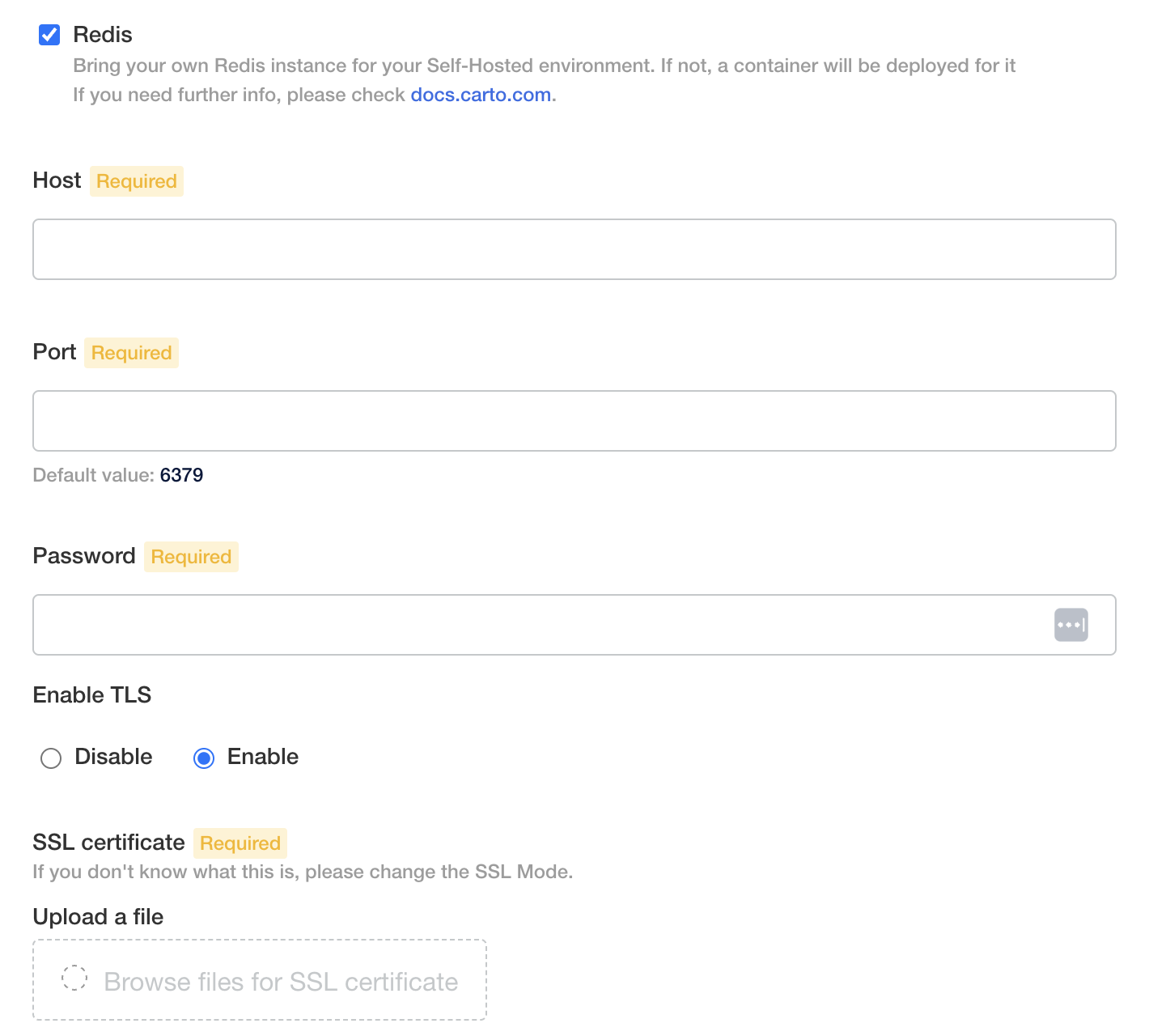
 In this section, you will see how to configure the Self-hosted to use an external Valkey provided by your cloud vendor. The needed changes can be applied from the Admin Console, as you'll have to update the following config:
 In this section, you will see how to configure the Self-hosted to use an external Valkey provided by your cloud vendor.
### Setup
{% tabs %}
{% tab title="Manually secrets creation" %}
1. Add the secret:
```bash
kubectl create secret generic \
-n
In this section, you will see how to configure the Self-hosted to use an external Valkey provided by your cloud vendor.
### Setup
{% tabs %}
{% tab title="Manually secrets creation" %}
1. Add the secret:
```bash
kubectl create secret generic \
-n